
From Zero to Linux Expert : Master the Terminal in 10 Days
10 Day Plan to Learn Linux for DevOps and Developers


(Sponsored) If you’re part of a team transitioning into AI, grab the Get It All: From Novice to Expert Bundle. It’s more cost-effective for multiple people and gives you a complete learning path from fundamentals through advanced topics.

Hello friends, we are glad to have Tech Fusionist here with his second guest post for Javarevisited readers. In the last post you learned about Kubernetes with visuals and now, he is going to share how you can learn and master Linux in just 10 days with same highly effective visual way.
Most people learning DevOps skip Linux — and regret it later.
Not because Linux is hard. Because the command line feels intimidating and the learning path is scattered across a thousand browser tabs. So, I redesigned the entire journey into a visual 10-day Linux roadmap 🐧
This roadmap takes you from:
Shell → Filesystem → Permissions → Processes → Networking → Scripting → Automation
Everything is explained visually, step-by-step, and beginner-friendly. No unnecessary theory. Just a structured path to help you actually live in the terminal — the way real DevOps engineers do.
Building a resilient, high-performing culture means prioritizing fast recovery over finger-pointing and that starts with confidently navigating the systems you manage. Remember the one idea that ties it all together: in Linux, everything is a file. Master the terminal, and you master DevOps.
Codemia.io (60% OFF) (Sponsored)

Codemia.io is a hands-on system design learning platform that helps you practice designing real systems step-by-step. It gives you challenges like designing YouTube, WhatsApp, or URL Shorteners and provides guided feedback as you iterate.
If you are preparing for System Design interview then you can use Codemia.io to solve real problems and learn what it takes to explain your solution on real interview. Their platform is both AI powered and give you tools to architect and explain you solution.
Roadmap Navigation
Module 1 → Foundations: Filesystem hierarchy, essential commands, navigation
PDF
Module 2 → Users, Permissions & Processes: Permissions, ownership, users, sudo, systemd
PDF
Module 3 → System & Network Admin: Package management, networking, SSH
PDF
Module 4 → Automation & Production Readiness: Bash scripting, log analysis, security & hardening
PDF
Module 1 - Foundations 🐧
Start here if the terminal still feels like a black box. This module builds the mental model you need before anything else: how Linux is structured, where files live, and the handful of commands you’ll type every single day.
Day 1 - Linux Fundamentals & Filesystem
Why ~90% of servers run Linux , how the system is layered (hardware → kernel → shell → user programs) , the Debian vs Red Hat families , and the Filesystem Hierarchy (/usr/bin, /usr/sbin, /etc, /home, /var, /proc).
Tip:
/is the root of the tree — don’t confuse it with/root.
If you need a resource, you can also checkout Colt Steele’s Linux Bootcamp on Udemy , its awesome.

Day 2 - Essential Commands & Navigation
The daily toolkit: pwd, ls -lah, cd, tree , plus create/copy/move/delete, viewing files (cat, less, head, tail -f) , finding things (find, grep, locate) , wildcards, and pipes & redirection.
locate uses a database and may require updatedb before finding recently created files.
Tip: Pipes +
grep+tailbecome your log-hunting toolkit — andrm -rfhas no undo, so always double-check the path.
If you need a comprehensive resource to master essential commands and navigation, You can also checkout Zero To Mastery: DevOps Bootcamp — Learn Linux & Become a Linux Sysadmin, its a great, comprehensive, and up-to-date resource for learning Linux.

Module 2 - Users, Permissions & Processes 🐧
Now Linux starts feeling like real system administration. This module covers the trio that trips up every beginner on a live server: who can do what, who you are, and what’s actually running.
Day 3 - File Permissions & Ownership
Reading ls -l, the rwx model , numeric (octal) permissions , chmod, chown/chgrp , umask and special bits. This is why your SSH key needs 600 and your scripts need +x.
Tip: Remember 4-2-1 , and Avoid
chmod 777unless you fully understand the security implications.
By the way, if you need an online course to learn Linux commands and concepts from A to Z then I suggest you can also checkout Enroll in Linux Mastery course on Udemy, its a great resource.

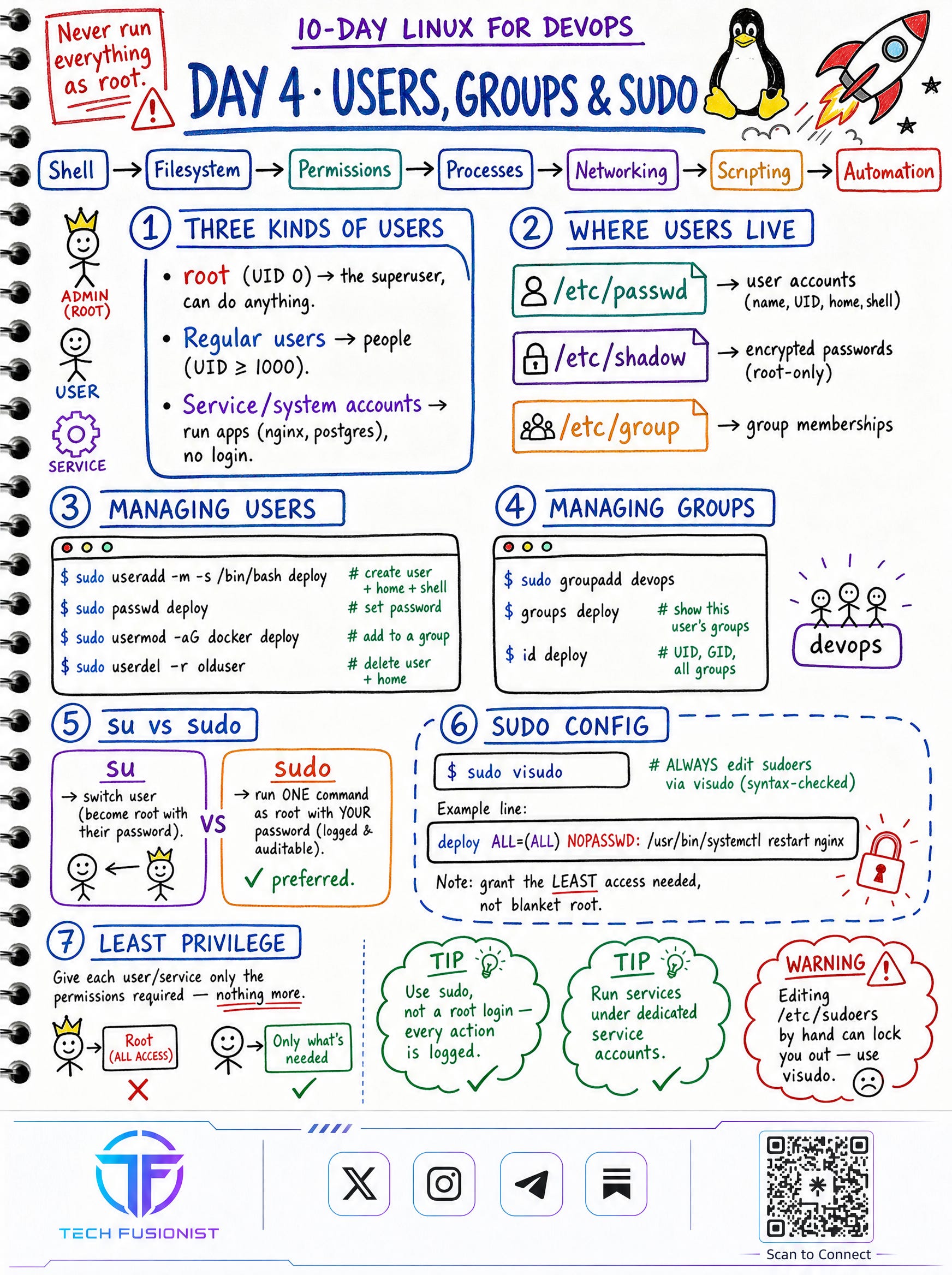
Day 4 - Users, Groups & sudo
The three kinds of users (root, regular, service accounts) , where users live (/etc/passwd, /etc/shadow, /etc/group) , managing users and groups, su vs sudo , and editing sudoers safely with visudo.
Tip: The golden rule: grant the least access needed, never blanket root.
Password hashes are stored in
/etc/shadow, not/etc/passwd.
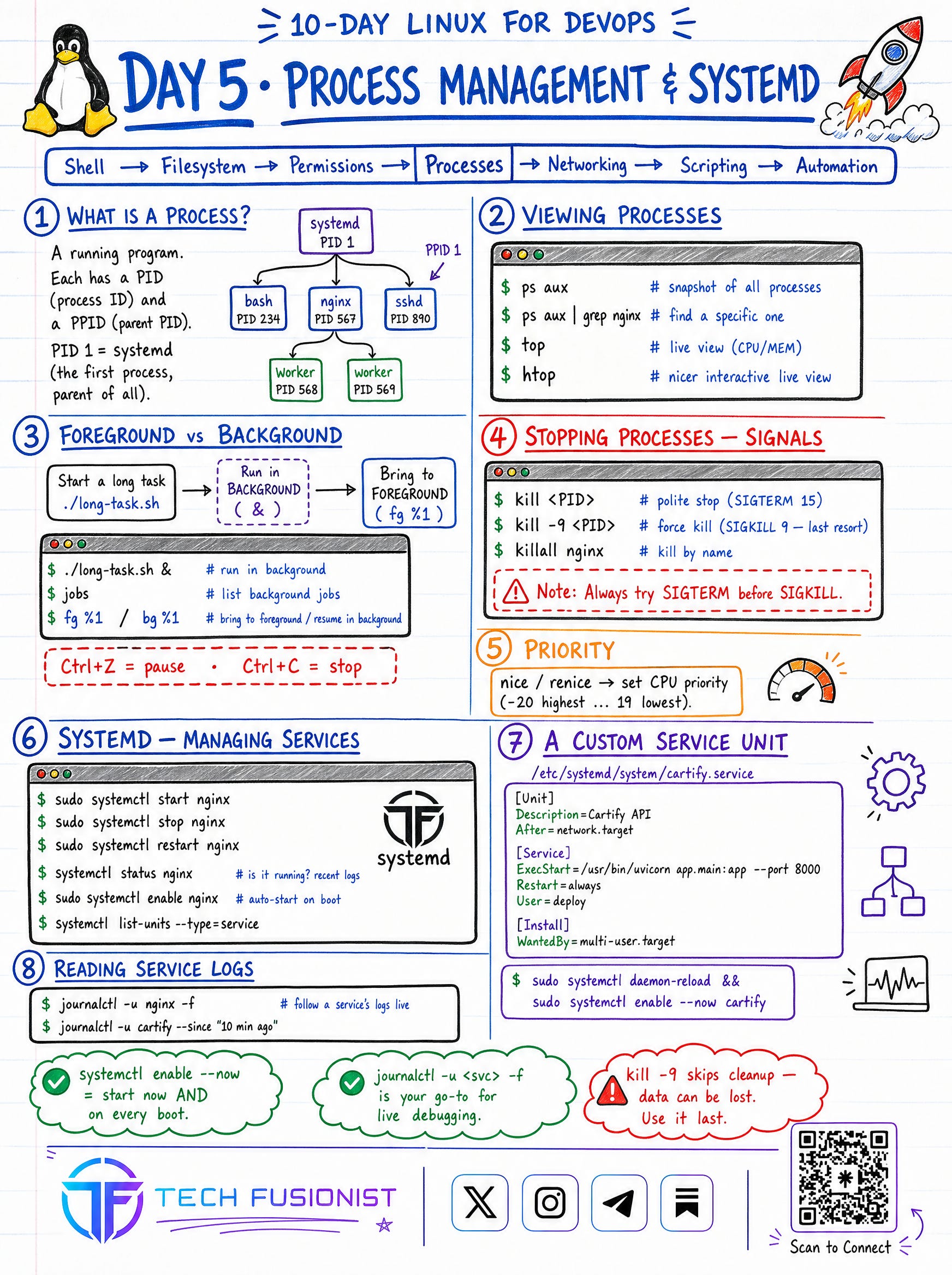
Day 5 - Process Management & systemd
What a process really is (PID, PPID, PID 1 = systemd) , viewing processes with ps/top/htop , foreground vs background jobs , signals (SIGTERM before SIGKILL) , priority with nice , and managing services with systemctl and journalctl.
Note: On most modern Linux distributions, systemd runs as PID 1.
Tip:
systemctl enable --nowandjournalctl -u <svc> -fbecome muscle memory.
Module 3 - System & Network Admin 🐧
This is where Linux begins to feel like real infrastructure engineering. You’ll learn how software gets onto a machine and how machines talk to each other — the two things every server depends on.
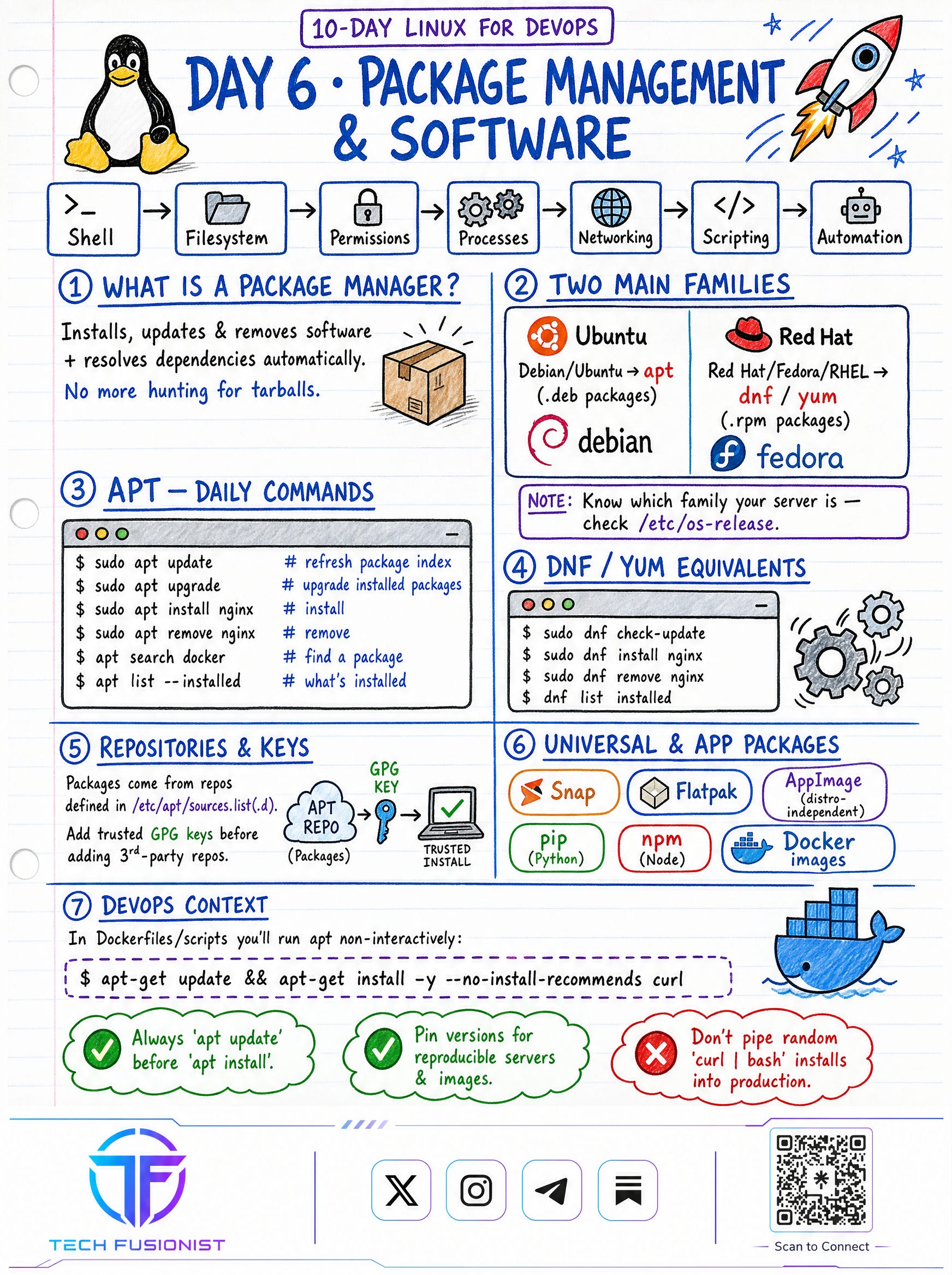
Day 6 - Package Management & Software
What a package manager actually does, the two families (apt for Debian/Ubuntu, dnf/yum for Red Hat/Fedora) , daily commands, repositories & GPG keys , and universal packages (Snap, Flatpak, pip, npm, Docker images).
Tip: Always
apt updatebeforeapt install- and never pipe a randomcurl | bashinto production.
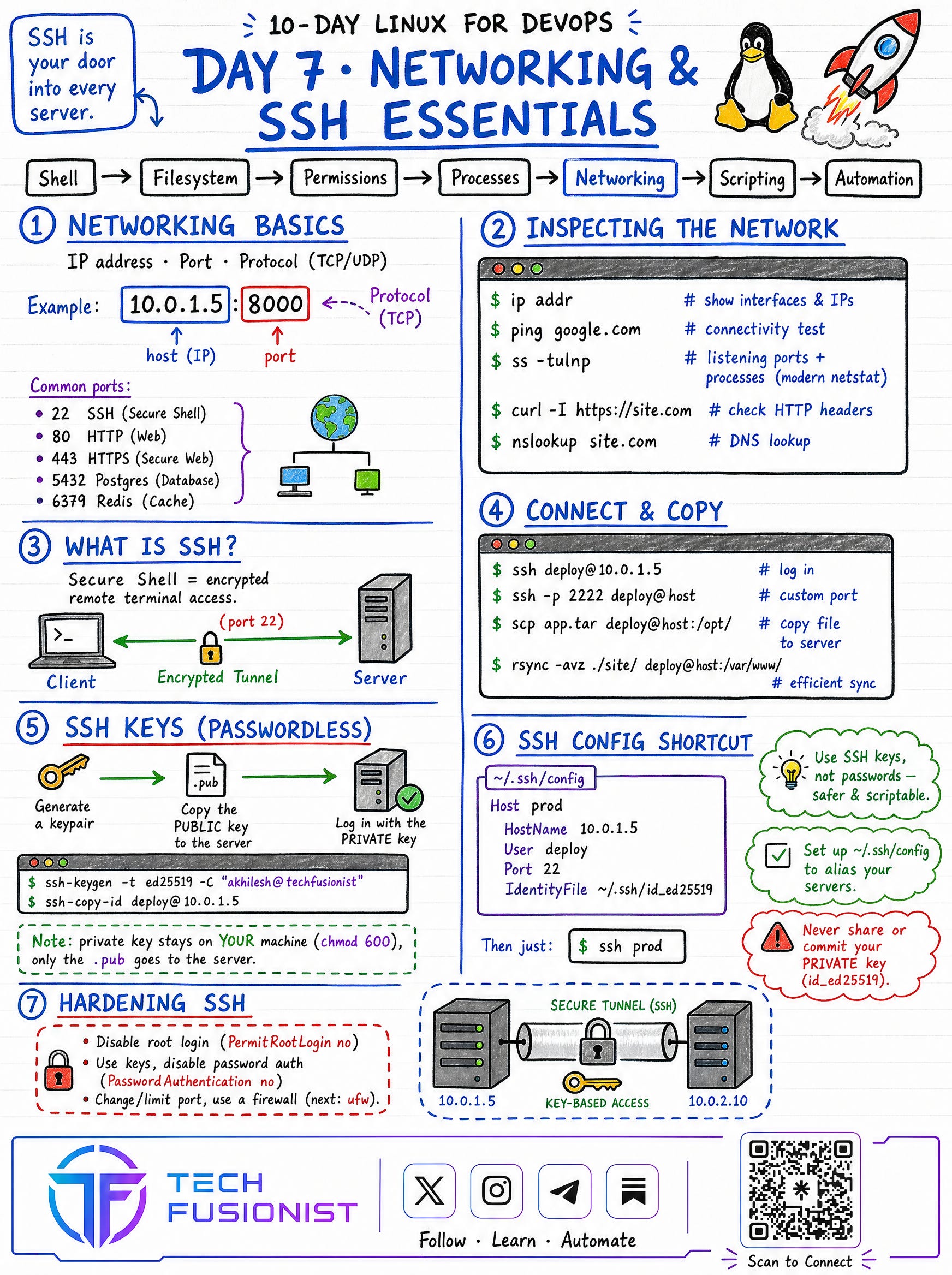
Day 7 - Networking & SSH Essentials
IP + port + protocol , common ports (22, 80, 443, 5432, 6379, 53, 3306) , inspecting the network (ip addr, ss -tulnp, curl -I, nslookup) , connecting and copying (ssh, scp, rsync) , passwordless SSH keys , the ~/.ssh/config shortcut , and hardening SSH.
Tip: Your private key stays on your machine (
chmod 600) — only the.pubgoes to the server.
Module 4 - Production Readiness 🐧
The final stage is where everything comes together into real automation. Scripting, log analysis, and security turn you from someone who uses a server into someone who can operate, automate, and defend one.
Day 8 - Bash Shell Scripting
Anatomy of a script (shebang, set -euo pipefail) , variables & arguments , conditions, loops , functions & exit codes , a real log-backup script , and scheduling with cron.
Note: Cron remains widely used, though modern distributions also support systemd timers.
Tip: Quote your variables (
"$VAR") to avoid word-splitting bugs , and always test in staging before scheduling on prod.
If you want to learn bash in depth and need a resource, I highly recommend you to checkout the learn bash course on Educative.

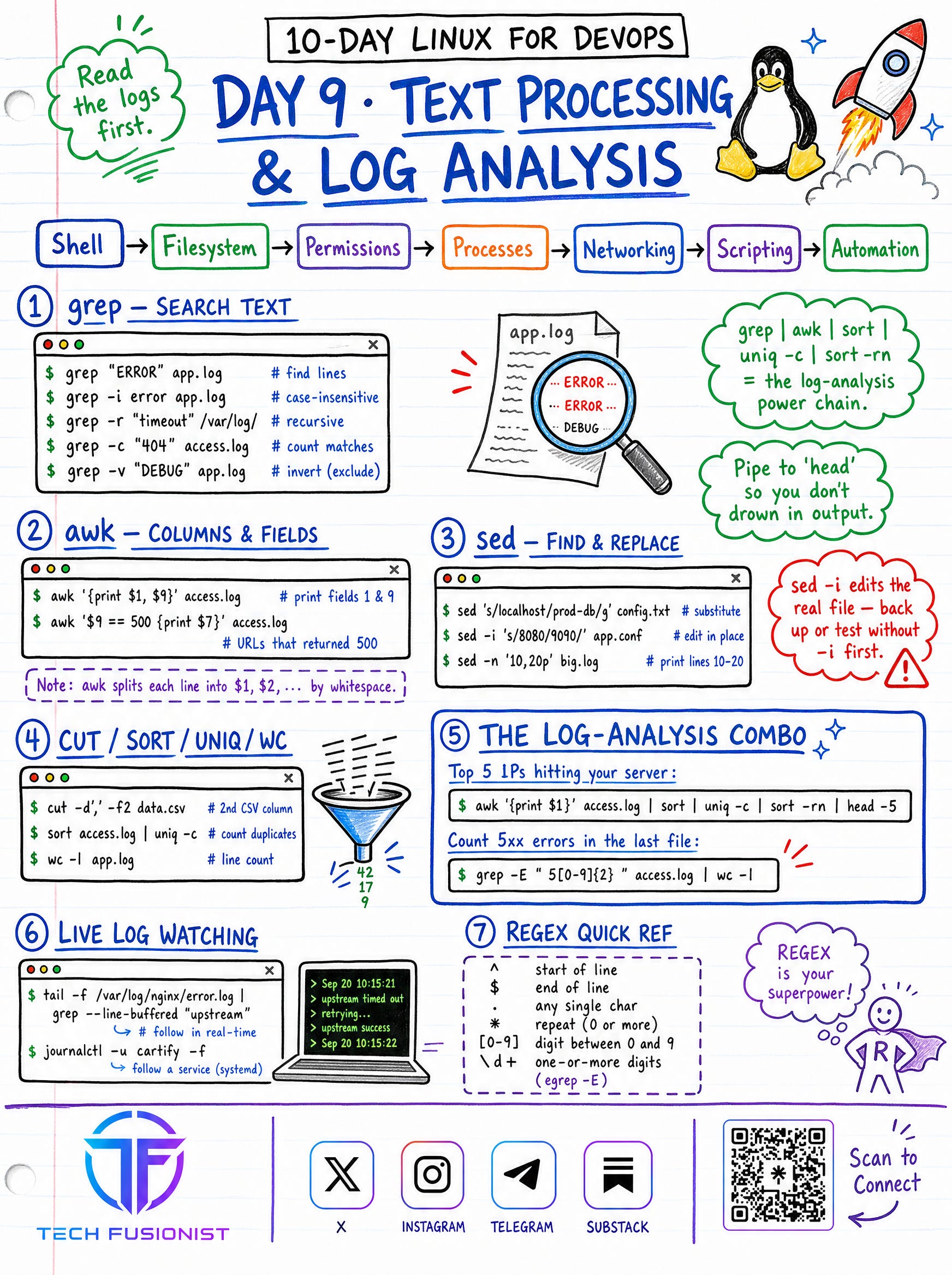
Day 9 - Text Processing & Log Analysis
The power chain every engineer leans on: grep | awk | sort | uniq -c | sort -rn | jq. Search with grep, slice columns with awk, find-and-replace with sed , and combine cut/sort/uniq/wc for instant answers from messy logs.
Tip: When something breaks, read the logs first.
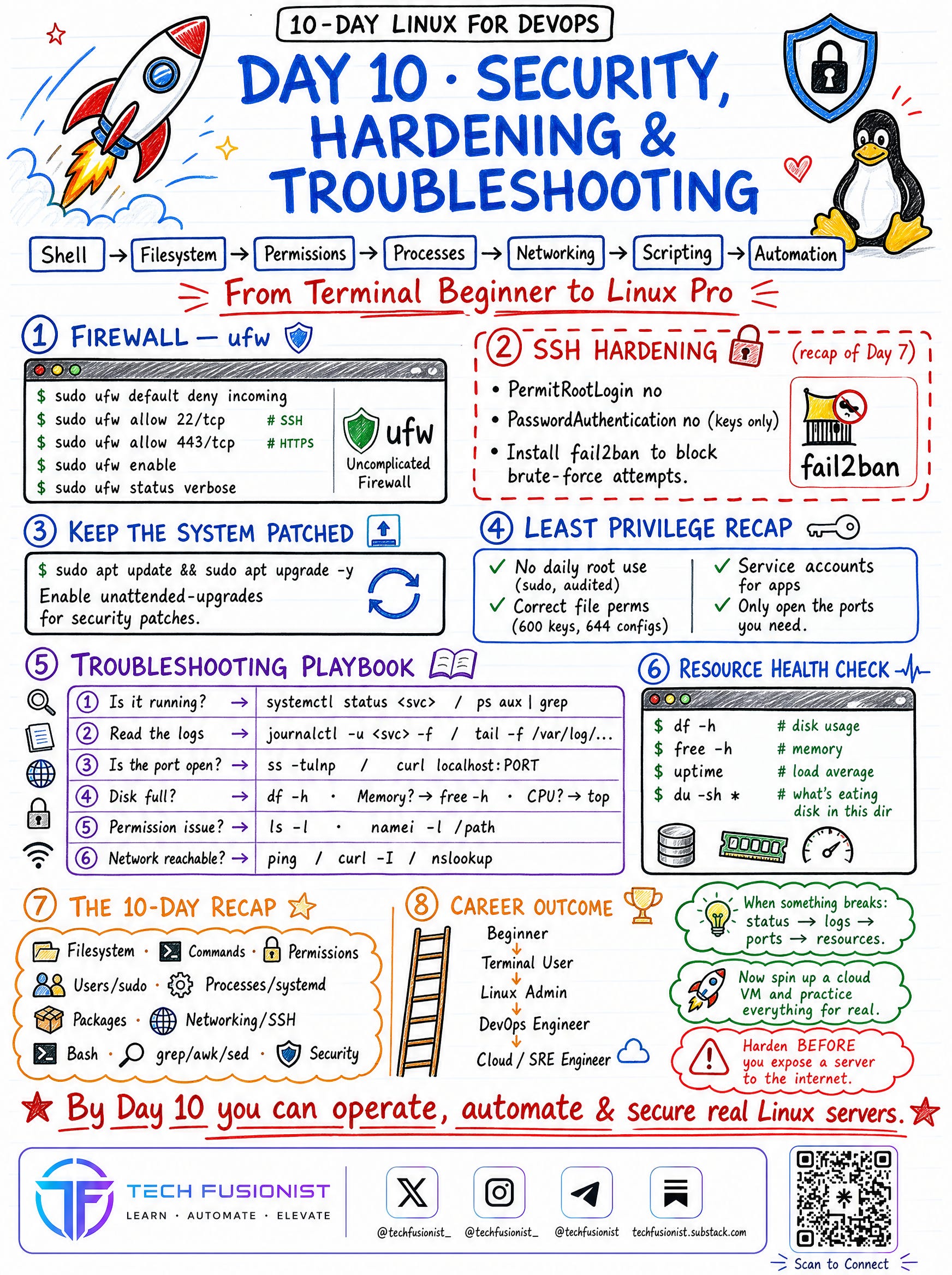
Day 10 - Security, Hardening & Troubleshooting
Locking a server down with firewalls, SSH hardening recap, keeping the system patched, the least-privilege checklist, a step-by-step troubleshooting playbook (status → logs → ports → resources), and resource health checks.
Tip:
Harden before you expose a server to the internet.
Disable password authentication and prefer SSH keys whenever possible.
Progress Tracker 🐧
[ ] Module 1 • Foundations
[ ] Module 2 • Users, Permissions & Processes
[ ] Module 3 • System & Network Admin
[ ] Module 4 • Production Readiness
Continue the Journey 🐧
Linux gets easier the moment you stop reading about it and start typing. Don’t try to memorize every flag.
Focus on:
Navigating the filesystem without thinking.
Fixing permissions and ownership confidently.
Reading logs to diagnose problems.
Writing small scripts to automate the boring stuff.
Hardening a box before it goes live.
That is how real Linux confidence is built. By Day 10, you’ll be able to operate, automate, and secure real Linux servers - the foundation everything else in DevOps sits on.
Follow Tech Fusionist on other platforms for more DevOps, Cloud, Linux, Kubernetes, and AI content.
🔗 Linktree: https://linktr.ee/techfusionist

P.S. — If you’re part of a team transitioning into AI, grab the Get It All: From Novice to Expert Bundle. It’s more cost-effective for multiple people and gives you a complete learning path from fundamentals through advanced topics.
 | A guest post by
|